Configurable Workflows Are the Future — Why I Built FlowDrop

TL;DR
- Ownership: Keep orchestration, data, and security inside your stack.
- Speed: Let teams reconfigure flows without rewriting glue code or waiting on vendors.
- Cost/Latency: Avoid cross‑cloud hops and per‑run surprise pricing.
- Reason I built FlowDrop: Provide a production‑ready visual editor you own end‑to‑end while your backend runs the workflow. Explore the repo: FlowDrop on GitHub.
The Problem With “Someone Else’s Workflow”
Most teams start with external orchestrators because they’re quick to demo. The long‑term tradeoffs show up as soon as the workflow becomes core:
- Lock‑in: Your execution semantics, scaling model, and pricing are dictated by the vendor.
- Latency & egress: Every hop off your VPC adds delay and cost, especially in AI chains.
- Compliance friction: PII/PHI and internal IP leaving your perimeter complicates audits.
- Integration drift: Your auth, secrets, and observability rarely match the vendor’s choices.
- Change tax: Small edits to flows can require big migrations because you don’t control the runtime.
If your workflows are mission‑critical and long‑lived, these frictions compound.
The Case for Configurable Workflows You Own
By “configurable,” I mean: product can evolve the graph (nodes, edges, inputs, outputs) visually, while engineering owns the runtime that executes it. Store the graph as JSON in your repo; review it like code; deploy through CI/CD.
This model delivers:
- Speed: Non‑engineers safely adjust flows; engineers harden the runtime.
- Safety: Data never leaves your environment; RBAC and audit trails are yours.
- Cost control: Scale horizontally on your infra; no per‑run surprises.
- Extensibility: Bring any tool/model/microservice without waiting for marketplace integrations.
Why I Built FlowDrop
I wanted teams to get a beautiful, production‑ready workflow UI in minutes—without adopting a vendor’s execution engine. FlowDrop is intentionally “just” the editor.
- Pure visual editor: No hosted control plane. No hidden backend. You own orchestration.
- Backend‑agnostic: Works with any API or stack (Drupal, Laravel, Express, FastAPI, your own).
- Enterprise‑friendly: Hooks for auth, lifecycle, policies, autosave, and theming.
- Fast adoption: Ship a polished editor with 7 node types and a calm, modern UI.
Project link: FlowDrop on GitHub
How It Works (in practice)
Mount the editor, point it at your endpoints, and treat the workflow JSON as first‑class configuration. The diagram below shows the responsibilities and boundaries.
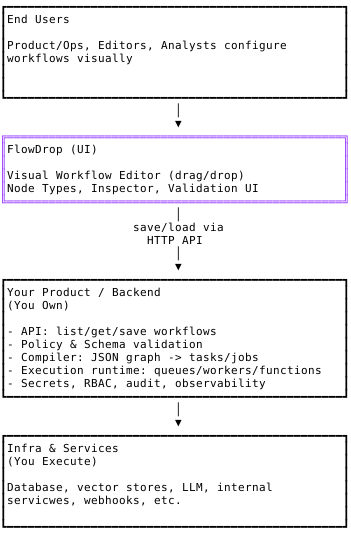
Description: The diagram shows boundaries between end users, FlowDrop (UI), your backend, and your infra. FlowDrop supplies the visual editor and produces/consumes workflow JSON. Your product exposes endpoints, enforces policy, compiles the graph into tasks/jobs, and executes them on your infrastructure with your secrets, RBAC, audit logs, and observability.
FlowDrop provides
- Visual editor, polished node types, and validation UX.
- Workflow JSON in/out; no hosted control plane or hidden backend.
- Optional auth and lifecycle hooks (autosave, dirty state, before‑unmount).
You implement and execute
- Endpoints to list/load/save workflows.
- Policy and schema validation for safety and governance.
- Compiler/translator from workflow JSON to your runtime (queues, workers, state machines, or wrappers over Airflow/Dagster).
- Execution with your secrets, RBAC, audit logs, and observability.
- Versioning, tests, and rollouts via your CI/CD.
When Configurable Beats “Code‑Only”
Use configuration when the flow changes faster than the tasks: approvals, retries, branching, routing, and budgets. Keep core logic as code; expose the “seams” (inputs/outputs/conditions) as config so teams can iterate safely.
Governance, Testing, and Scale
- GitOps by default: Commit workflow JSON next to code; review with PRs.
- Policy as code: Lint for forbidden edges, unbounded loops, or missing approvals.
- Deterministic deployments: Build once; supply environment config at runtime.
- Observability: Map graph → task → infra logs/spans for root‑cause analysis.
Migration Path
- Visualize existing flows; keep your current runtime.
- Wrap legacy steps as nodes; add validation/policy checks on save.
- Move glue code into typed, reusable tasks; keep the graph stable.
- Introduce approvals, budgets, and rollbacks as configuration—not rewrites.
Closing Thoughts
Configurable workflows let you move at product speed without sacrificing engineering rigor. Put the graph in users’ hands; keep execution in your stack. That’s the future I believe in—and the reason I built FlowDrop.
- Explore the repo: FlowDrop on GitHub
- Try it in five minutes:
npm install @flowdrop/flowdrop - Replace brittle glue code with a graph you can trust.
Edit — 2026-03-18: Updated GitHub link and npm package name to reflect the project’s new home under the
flowdrop-ioorganisation. The correct references are github.com/flowdrop-io/flowdrop and@flowdrop/flowdropon npm.