Legacy 3 min
Drupal meets Fabric
Managing several Drupal instances across servers with fabalicious, a deployment script built on Python Fabric.
Managing multiple instances of Drupal using fabalicious powered by fabric
Scenario
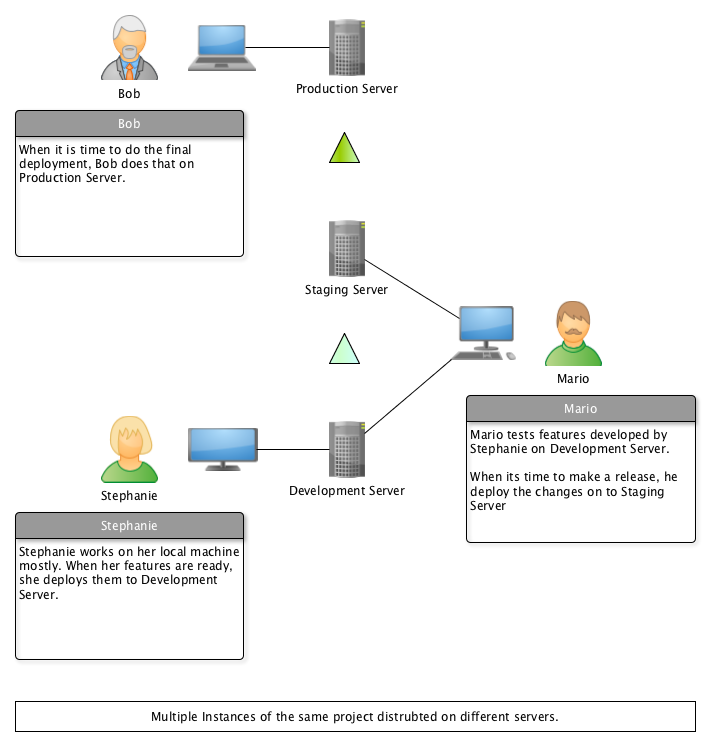
Lets look at a typical deployment cycle that we follow on Drupal installations,
SSH: into development serverTERMINAL: navigate to project root folderDRUSH: put site into maintenance modeDRUSH: take database backupGIT: pull develop branch from upstreamDRUSH: run database updatesDRUSH: clear cacheDRUSH: turn off maintenance mode
These steps with very little variations is prefomed by Stephanie, Mario and Bob.
As the number of projects grew, so did the number of instances of Drupal we have to deploy and maintain. And good luck if you are the Stephanie, Mario and Bob in your company.
The Problem
- Needed some way to keep track of all the instances related to a particular project.
- Wanted somebody to take care of the mundane repititive task of deployment.
A script to automate the whole process is obviously helpful. We also needed something that would take care of running our script accross various servers.
Thats where fabric comes to help us.
What is Fabric?
Fabric is a Python (2.5-2.7) library and command-line tool for streamlining the use of SSH for application deployment or systems administration tasks. ~ http://www.fabfile.org/
So after installing fabric, you can create two files inside your project folder.
-
fabfile.pyis where you would define your tasks. -
fabfile.yamlis where we would store our project specific configurations.
This is so that we could reuse fabfile.py in other projects without hacking it everytime.
So let say we create a task called deploy in fabfile.py and specified our configuration for development server in fabfile.yaml under key develop. Then we could simply do fab config:develop deploy. While the fabric runs all the deployment task for you. You can go, grab a coffee, or collect your dark elixers from Clash of Clans, or tell me what you did with the extra time you got in comments below.
Over time you keep on adding more and more tasks into fabfile.py and eventually start adding it as a submodule to every project.
Thats how fabalicious was born.
fabalicious is nothing other than the fabfile.py, that nice folks at factorial.io created for internal use.
Fabalicious
Fabalicious is specially crafted deployment script to help deploy drupal installations across different servers. It reads a yaml-file called fabfile.yaml where all project specific hosts are defined.
Basic Usage Example.
Prerequisite:
- You have ssh access to the servers where you want to peform tasks.
- The individual components of tasks could be executed on the server.
When using fabalicious, all we need to do is populate the fabfile.yaml with details about the server.
Below is a populated fabfile.yaml for a typical setup involving development, staging and production server.
name: myproject
requires: 2.0

deploymentModule: myproject_deploy

excludeFiles:
  backup:
    - "styles"
    - "tmp"
  copyFrom:
    - "tmp"
    - "styles"

hosts:
  dev:
    host: example.com
    type: dev
    user: root
    password: root
    port: 22
    # path to drupal's root folder
    rootFolder: /var/static/myproject/staging/public
    gitRootFolder: /var/static/myproject/staging/
    # path to the site's folder
    siteFolder: /sites/default
    filesFolder: /sites/default/files
    backupFolder: /var/static/myproject/staging/backups
    # branch to pull
    branch: develop
    supportsInstalls: true
    database:
      name: myproject
      user: root
      pass: admin
  stage:
    inheritsFrom: dev
    host: example.com
    type: stage
    # branch to pull
    branch: release/0.1.0
    rootFolder: /var/static/myproject/010/public
    gitRootFolder: /var/static/myproject/010/
    database:
      name: myproject_010
      user: root
      pass: admin
  production:
    host: production.com
    type: live
    user: root
    password: root
    port: 22
    # path to drupal's root folder
    rootFolder: /var/www/public
    gitRootFolder: /var/www/
    # path to the site's folder
    siteFolder: /sites/default
    filesFolder: /sites/default/files
    backupFolder: /var/www/backups
    # branch to pull
    branch: master
    supportsInstalls: false
    database:
      name: production
      user: root
      pass: admin
Then we could,
fab config:dev deploy: Deploy on development server.fab config:stage copyDBFrom:production: Copy database from production to staging.fab config:stage drush:"cc all": To execute a drush command on staging to clear cache.- and so on …
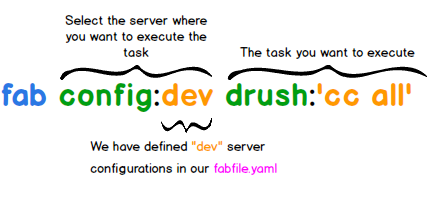
Many common tasks like deployment, reset, install, drush, drupalConsole, backup, copyFrom, copyDBFrom, etc are already supported.
NOTE: git, drush and drupal_console has to be present in remote installation to be able to use them
Fabalicious also has some exclusive support for multibasebox, which helps you to serve multiple docker container with the help of haproxy from one vagrant-host.
Please visit the project page of fabalicious to know what all tasks have already been implemented.
Conclusion
For those who don’t want to get their hands dirty in scripting, fabalicious provides a decent set of tasks that you could perform with fabric on Drupal sites.