Legacy 2 min
Setting up Drupal project and fabric
Adding fabalicious to a Drupal project and wiring it into a git-flow branching setup.
Before we start discussing about the actual setup, hope you are acquainted with the following.
- Drupal - A free and open source content managment system written in PHP
- Git - A free and open source distributed version control system
- Fabric - A Python (2.5-2.7) library and command-line tool for streamlining the use of SSH for application deployment or systems administration tasks
- Fabalicious - A specially crafted deployment script based on fabric to help deploy drupal installations across different servers
Adding fabalicious to your project
STEP 1: Install fabric
Skip this step if fabric is already installed in your system.
You can install fabric using pip by running following command.
pip install fabricFor more detailed explanation on how to install fabric, visit this link.
STEP 2: Add fabfile.py to project
Copy fabfile.py from the fabalicious project directly to your project.
OR
Optionally (recomended) add fabalicious as submodule if you are already using git to manage your project. To add fabalicious as submodule, do the following,
- Create a folder named _tools in your project root.
- Add fabalicious as a git submodule under this folder.
- Create a symbolic link to _tools/fabalicious/fabfile.py in the project root.
mkdir _tools
git submodule add https://github.com/factorial-io/fabalicious.git _tools/fabalicious
ln -s _tools/fabalicious/fabfile.py fabfile.py
git add fabfile.py
git commit -m "Add fabalicious as submodule"
STEP 3: Create project specific fabfile.yaml
Create fabfile.yaml under project folder and populate it with server details.
name: My awesome project
requires: 2.0
needs:
  - ssh
  - git

# Our list of host-configurations
hosts:
  dev:
  type: dev
  host: example.com
  user: root
  port: 22
  rootFolder: /var/www
  filesFolder: /sites/default/files
  siteFolder: /sites/default
  backupFolder: /var/backups
Using Fabalicious
Fabalicious command structure if of format fab config:<host> <task>.
Example
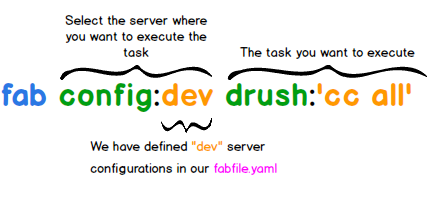
If drush is installed on your dev server then you can try clearing cache by running fab config:dev drush:'cc all'
$ fab config:dev drush:'cc all'
Fabalicious deployment scripts

[104.131.xxx.xxx] Executing task 'drush'
[notice] 'all' cache was cleared.

Done.
Disconnecting from 104.131.xxx.xxx... done.
TIP: If you include your public key to authorized keys on the remote server then it wont prompt for your password
To see a full list of supported task, please checkout the tasks documentation in fabalicious project.
What next?
Using Gitflow with fabalicious
Gitflow is a successful Git branching model by Vincent Driessen.
- A simple and elegant git branching workflow easy to understand and follow.
- Has a git extention which provides high level repository actions to make it developer life easier.
- Has become popular and comes integrated with some git client ui.
In fabfile.yaml, you can specifiy the branch that needs to be checked out and pulled while deploying. Thus you continue with your gitflow workflow where development will checkout develop branch, production will checkout master branch and so on.
hosts:
  dev:
  branch: develop
  type: dev
  host: example.com